Playwright in the Real World: Lessons and Plugins
6 min read quality , process , practices , testing , automation
Over the past few years, I’ve been using Playwright almost every day.
Over time, it stopped being “just another tool” and became a core part of how I approach web software quality. Honestly, it’s hard to find something that works better: the HTML report is clear, multi-browser support is reliable, the trace viewer is incredibly powerful, and parallelization (workers, shards) works seamlessly.
Add to that the speed - thanks to direct WebSocket communication with the browser, without going through the WebDriver protocol - and auto-waiting that makes a real difference in daily work.
But the interesting point isn’t where Playwright works well.
It’s where, using it every day, you start to notice friction.
Not because the tool is limited, but because you’re using it in increasingly complex scenarios: larger test suites, bigger teams, distributed architectures. And it’s exactly in those moments that I started building small supporting tools.
When the Suite Grows, the Problem Changes
At first, everything is simple. Tests are few, readable, and when something fails, you immediately know why.
Then the suite grows. With it, problems grow: more flows, more microservices involved, more teams contributing, and inevitably, more noise in the reports.
At that point, the problem is no longer writing tests.
The real challenge becomes quickly understanding what’s happening when something goes wrong.
And this is where everything else starts.
Navigating the Trace Without Losing Context
With Playwright version 1.59 I contributed to introducing some improvements in filtering steps and actions, both in the Trace Viewer and the HTML report.
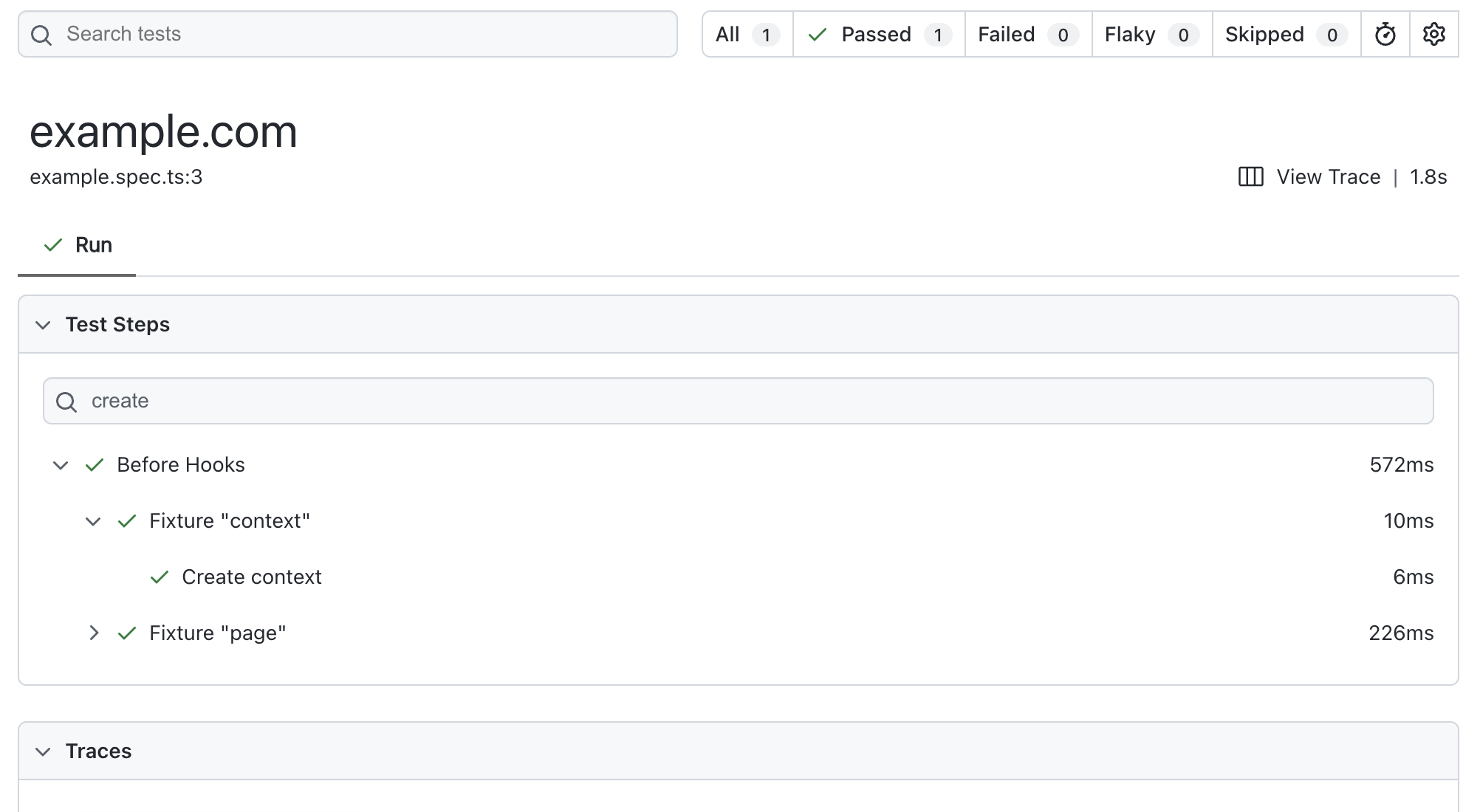
It’s one of those features that seems minor but hits a very sensitive point in practice.
Because yes, when a test fails, Playwright takes you to the right spot. But often what you really need is context: what happened before, which steps were executed, where the flow broke.
When tests become more complex - perhaps using Page Objects or grouped steps - this translates into a concrete issue: scrolling manually through a long list of actions, searching “by eye” for the right spot.
It’s not a blocking problem, but it interrupts your mental flow. And that’s exactly when you start wishing for more targeted search and filter tools.
But to search better, you also need something else.
You need better information to search for.
Giving Steps Meaning
As you structure tests properly, actions become increasingly abstract. Code improves, but reports lose readability.
You end up with technically correct output, but not expressive.
The immediate solution is using test.step, but over time, it becomes clear this is not scalable: it’s invasive, verbose, and tends to “pollute” application code with testing details.
This is where playwright-step-decorator-plugin comes in.
The idea is simple: add context to steps without having to explicitly pass Playwright around your code.
Instead of manually inserting steps everywhere, you can decorate actions and automatically enrich traces and reports with readable, meaningful information.
The result is immediate: when you read a trace, you no longer interpret selectors or technical calls - you follow a comprehensible flow.
And once tests are readable, another need emerges.
Running Only What Matters
In microservice architectures, E2E tests start becoming cross-cutting. They span multiple services, domains, and responsibilities.
And that makes them expensive.
At that point, it’s natural to ask: does it really make sense to run everything all the time?
Here comes playwright-dynamic-tagger-plugin.
The goal is to make test tagging more dynamic and flexible. Not just static labels, but the ability to select tests based on what they actually involve: a service, a domain, or a specific flow.
This completely changes how the suite runs. Instead of pipelines that run everything indiscriminately, you can build targeted runs that are much faster and meaningful.
And when the system becomes more efficient… a different problem emerges.
Test Responsibility
When an E2E test fails, especially in complex systems, the hardest question is not technical.
It’s organizational.
Who should intervene?
If multiple teams work on the same UI, figuring out ownership can take more time than debugging itself.
From this need comes playwright-team-domain-plugin.
The idea is to explicitly associate tests and application areas to teams or domains. When a test fails, the context is already there: you know immediately who to involve.
It’s a solution that doesn’t improve the test itself, but dramatically improves the system around it.
Even after solving this, a classic problem remains.
Flaky Tests (and False Solutions)
Flaky tests are not inevitable, but they are extremely likely, especially when working with complex E2E tests.
The most common response is also the most dangerous: increase timeouts or add waits.
It works short-term but creates slow, unreliable suites in the long run.
From this frustration comes playwright-smart-retry-plugin.
Its idea is to handle retries intelligently, avoiding blind approaches. Instead of slowing everything down, it reacts to failures in a targeted way, keeping passing tests fast and isolating problematic ones.
This doesn’t eliminate flaky tests but drastically reduces their impact.
The focus now inevitably shifts to the pipeline.
When CI Stops Being an Ally
As the suite grows and some tests become unstable, CI can turn from a safety tool into a bottleneck.
Slow pipelines, blocked deploys, declining trust.
In this context comes @get-skipper/playwright.
A pragmatic solution: keep the delivery process smooth even when the suite isn’t perfect.
It’s not “clean” in an academic sense, but extremely realistic. In complex systems, this type of approach often makes the real difference.
And it’s working in these scenarios that reveals the most interesting details.
When a Skip Is Not Really a Skip
This is one of those problems that rarely appears in small projects.
But in real-world contexts, it inevitably does.
I discovered that even when a test is skipped at runtime, the test.afterEach hooks still execute.
At first, it seems minor. Then you start seeing the effects:
- unnecessary cleanup
- calls to external services that shouldn’t run
- side effects that are hard to track
- unexplained slowdowns
That’s when you realize: the problem isn’t the skip itself, but that it’s not “complete”.
From here comes playwright-skip-aftereach-plugin.
Its goal is to make behavior consistent and predictable, avoiding afterEach execution when a test is skipped at runtime.
Instead of sprinkling defensive checks in code, the plugin centralizes logic and makes expected behavior explicit.
It’s one of those cases where you don’t add visible features but eliminate an entire class of tricky issues.
Performance and Control
When the suite really grows, the inevitable question arises: how long does it all take?
It’s not just about parallelization, but controlling how tests are distributed, when they run, and how resources are used efficiently.
This leads to playwright-scheduler-plugin.
The goal is to introduce finer-grained control over execution, avoiding bottlenecks and improving overall pipeline time.
Because in the end, the problem is always the same:
slow tests → slow feedback → less trust → less use of tests.
Conclusion
Playwright is incredible.
But the most interesting part for me wasn’t just using it.
It was understanding where it started to creak, and building something on top.
All these plugins were born there: from real problems encountered day after day.
They aren’t perfect solutions, but concrete attempts to reduce friction, improve signal, and make tests not just correct, but truly useful.
If you work daily with E2E tests, many of these situations will sound familiar.
And you might find yourself agreeing with this idea:
The best way to improve a tool is to start building around it.